

So, someone just gave their two weeks. Now what?
They’re a tenured, trusted, highly capable employee. They’ve been around long enough to know the ins and outs of your systems, your procedures, your team’s quirks, and your unwritten rules. And now they’re leaving.
You’ve got 10 business days to do more than just react. You’ve got a project now, and that project is to document the SOPs and know‑how this person uses to do their job.
If you don’t, their knowledge walks out the door with them.
In this blog, I’ll walk you through exactly how to tackle that project in a way that feels structured and manageable. It’s the same method we use with teams who say, “We should’ve documented this months ago.”
The good news? You don’t need months. You just need two weeks and a clear plan.
P.S. We built a step-by-step Find & Follow Playbook for this exact situation. Get it for free here.
First, why does this feel like a crisis?
The stress doesn’t come from the departure itself. It comes from what the person knows.
You’re not just losing a set of hands. You’re losing the background knowledge, problem‑solving experience, and proven processes that make the role run smoothly.
If you don’t act quickly, you risk serious knowledge loss, which makes it harder to onboard a new hire, help your team cover the gap, or keep things running without disruption.
That’s why documenting SOPs before they leave isn’t just a nice‑to‑have. It’s the project you need to start today.
A better approach: Transfer, don’t extract
Let’s be clear about what this project is not...
It’s not about pulling everything out of someone’s head and dumping it into a Google Doc or SharePoint folder. That’s knowledge extraction. It might feel productive in the moment, but it’s not actually useful.
This project is about creating a system to transfer what they know clearly, usefully, and in a format someone else can actually follow.
That means:
- Organizing tribal knowledge before it’s gone
- Creating digital guides that a new hire can find, follow, and trust
- Capturing both the tasks and the context behind them
That’s what turns a departure into a transition instead of a crisis.
Your 2‑week SOP documentation project plan for when a key employee quits
Here’s how to turn that “we need to get this documented” feeling into a clear, step‑by‑step project.
Step 1: Build your SOP structure
Time: 30–60 minutes
Before you capture anything, set up the bones of your SOP documentation.
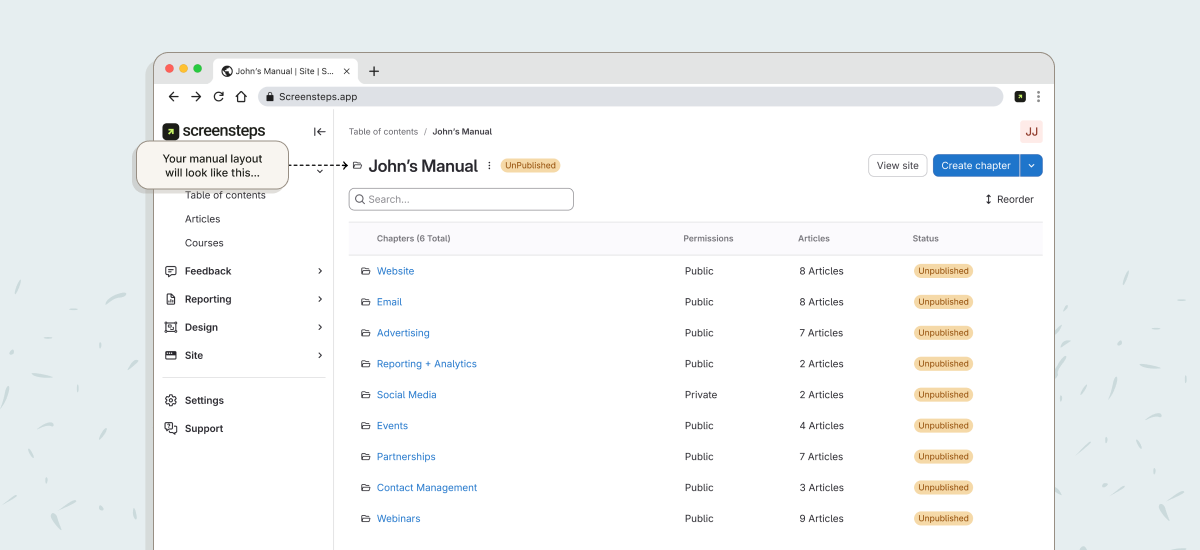
- Create a manual in your knowledge base and name it after the person (like “John’s Manual”)
- Add chapters for their key areas of responsibility (Website, Email, Advertising, etc.)
- Inside each chapter, create article placeholders for specific tasks
- Separate articles into Actionable Guides and Foundational Knowledge
You’re not writing the content yet. You’re building the framework to fill in. This makes the documentation process fast and focused instead of overwhelming.
Step 2: Capture what they know
Time: 2–7 minutes per guide
Now that the structure’s in place, it’s time to fill it in.
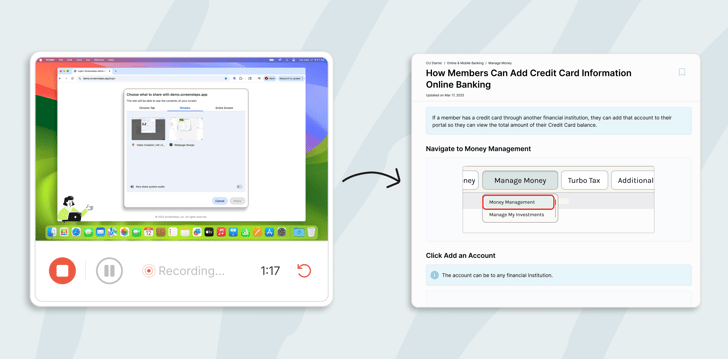
Don’t ask your employee to write everything down. Have them talk through what they do and use a tool like Clarify AI Create to turn that into clean, formatted SOPs.
- Open each placeholder article
- Have them explain the task while recording audio
- Let AI create a formatted, step‑by‑step SOP
- Add screenshots or videos where needed
- Use AI assistants to draft background knowledge or general info
You’re not trying to capture everything, just the pieces that matter to performing the work well.
This is the heart of the project: turning what’s in someone’s head into usable SOPs that others can rely on.
TIP: Use Clarify AI Create Video to turn video recordings into documented SOPs with screenshots.
Step 3: Test the SOPs

Time: 2–3 hours
Once the SOPs are in place, validate that they actually work.
- Have someone follow the guide as if they’re brand new
- Don’t skip steps or fill in gaps from memory
- Mark anything that’s unclear or confusing
- Make quick edits yourself, or assign the guide back to the employee to fix
Remember, you’re not just documenting everything they know. You’re creating guides that others can find, follow, and trust.
TIP: Use the ScreenSteps Sidekick browser extension to find and follow guides in the website the employee works in, just as the replacement will.
Step 4: Train the replacement

Time: 1–2 weeks
Whether you’re bringing in a new hire or having another team member step in, this is when your project really starts to pay off.
- Start with the foundational articles so they understand the why
- Give them real scenarios and have them use the documented SOPs to complete the work
- Focus on helping them become confident with the system, not memorizing tasks
You’ve now shifted the training from “shadow someone and hope” to “follow the guide and succeed.”
Step 5: Keep the documentation alive
Time: Ongoing
Your SOP documentation project doesn’t end when the person leaves. But now you have a solid structure in place to keep it going.
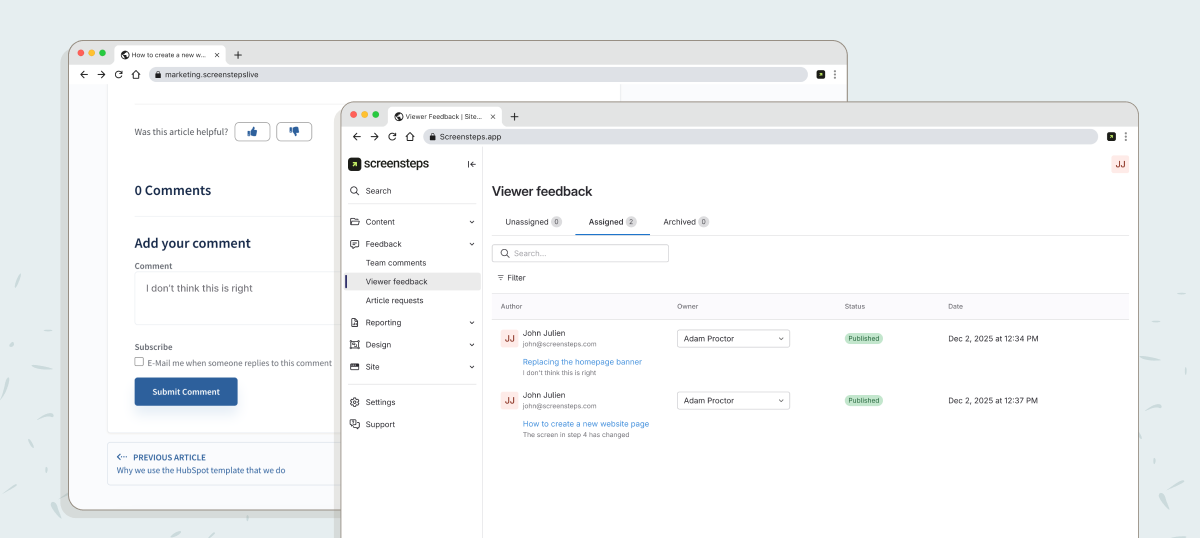
- Use comments to flag outdated steps
- Use AI to make quick updates when things change
- Add new guides as the role evolves
- Encourage team members to use and maintain the system as part of their workflow
You’re building more than documentation. You’re building change resilience.
You can complete this in two weeks
The second someone gives notice, this becomes your priority project.
You’re not just handling the offboarding. You’re responsible for capturing what they know, organizing it into SOPs, and preparing the next person to succeed. And you don’t need to start from scratch.
With the right tools, a simple structure, and a focused approach, you can:
- Document what matters
- Transfer knowledge quickly
- Train someone to take over without chaos
This isn’t just doable. It’s repeatable, and it sets your team up to handle transitions better in the future.
Want the full step‑by‑step plan?
If you’re working through this right now or want to be ready before it happens, we’ve created a full playbook that outlines every part of this documentation project.
Inside the Find & Follow Playbook, you’ll get:
- A complete SOP documentation plan for two‑week notice situations
- Templates and examples for structuring manuals, chapters, and guides
- How to capture both task‑based SOPs and background knowledge
- Steps for testing and training replacements using your documentation
- Tips for keeping things accurate and usable over time
Or, if you want to talk it through with someone, schedule a quick walkthrough with our team.
You’ve got this. We’ll help you make it happen.