

Most knowledge management evaluations test the wrong thing. Teams compare feature lists, sit through polished demos, and pick the tool that looks best in a conference room. Then the rollout drags on, employees never really adopt it, and they live with that choice for years.
I've worked in knowledge management and training for more than 20 years, much of it selling software. I've watched organizations evaluate these tools every way you can imagine: 1,000-question RFPs, a room full of people voting on which demo looked nicest, or one person's recommendation. I've also worked with a lot of teams who regretted the choice they made.
This three-gate evaluation will outline a better way to score knowledge management or procedure platforms.
We've turned this evaluation into a fillable scorecard, which you can download here.
Who this guide is for
This guide is for you if most of these sound familiar:
- Your organization has a lot of procedures.
- Some of them are complex.
- They change often.
- Getting a procedure wrong has real consequences.
It's written mainly for regulated industries like financial institutions, healthcare, and government agencies. The same approach works for any business with complex processes that change frequently.

Stop shopping for features. Start removing risk.
Business software exists to change business outcomes. The biggest threat to that is a failed implementation. A feature doesn't matter if nobody uses it to change how work gets done.
So spend less time hunting for features you like and more time asking one question: what could make this implementation fail? Then test each of those risks directly.
Think of each risk as a gate. If the solution doesn't pass any one of them, you should probably look for a different solution.
Step 0: Confirm the table stakes
Before you run any gates, check the basics. These don't set one platform apart from another. Every platform in a regulated environment needs them, so missing any one is enough to cross a platform off your list.
Ask to see each one live in the product. A slide or a "yes" on a questionnaire doesn't count.
- Revision management: Some form of revision management should be required.
- Audit logs: If you are working in a regulated industry, these are crucial.
- Reporting: No reporting means no visibility and no accountability. Don’t choose a system with no reporting.
- Authoring and viewing permissions: Can you control who can author, approve, and publish? Can you do that for different pieces or collections of content?
If a platform clears all four, move on to the gates.
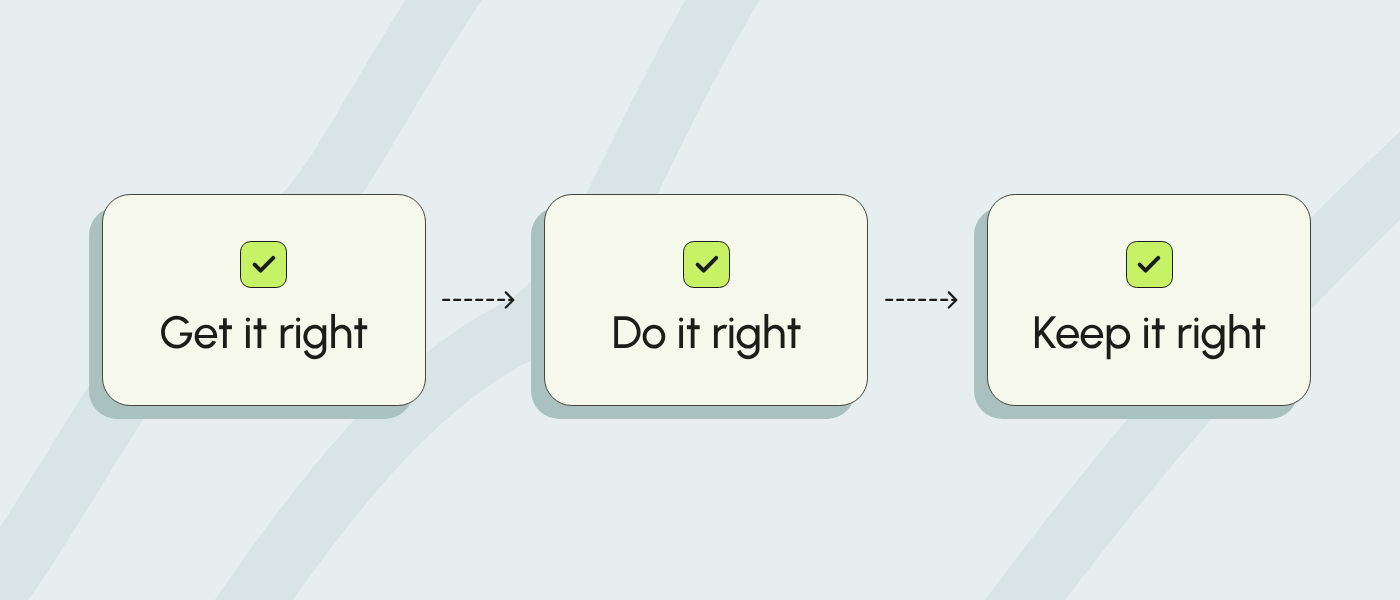
The three gates: get it right, do it right, keep it right
Every knowledge management or procedure platform implementation lives or dies on three questions:
- Get it right: Will your team be able to create content at the required pace?
- Do it right: Will your frontline employees be able to use the content successfully to do their job?
- Keep it right: Can your team keep content up to date as things change?
Fail any one of these, and you end up in the same place: employees relying on tribal knowledge and a content team that's always behind.
Run the gates in order. Gate 1 comes first for a reason. If your team can't create content quickly, nothing after it matters.
Gate 1: Get it right (capturing procedures)
The risk: Your team can't document procedures fast enough, and the project drags on for a year or more.
No team has unlimited time to write procedures. Your subject matter experts (SMEs) will have to work with a content team to update what exists and fill the gaps. I've seen knowledge management projects run for years because the team could never capture everything it needed. So the first test is speed.
How to test it:
- Improve an existing procedure. Bring one of your real procedures into the platform. How easy is it to review? How easy is it to improve it? Is it clearer when you're done?
- Create and publish a new procedure. Could your authors use the tools without help? How long did it take? Did the software nudge them toward best practices?
- Capture a process with an SME. Could the SME collaborate easily? How long did it take from start to finish?
If this is slow or painful, stop here. Nothing else matters if you can't create content at the pace you need.
Gate 2: Do it right (driving performance)
The risk: Your employees can't find the right procedure, or can't follow it correctly when it counts.
This is the gate most evaluations skip, because the only people giving feedback are the content authors. But content is worthless if employees can't find it and follow it. A wall of text no longer cuts it when compliance and competence matter.
How to test it:
- Pick two or three frontline employees. They should be people who'll use the content every day.
- Give them a scenario that often causes mistakes or confusion.
- Have them find the procedure for that scenario in the platform. Did they land on the right one?
- Ask them to talk through using it as if they were doing the work. Could they follow it correctly without help?
Two tips to get a fair read:
- Coach the search. Many employees come from tools that only use keyword search, so they've learned to guess article titles. A modern system should let them describe the situation in their own words instead. Show them how before the test, then watch whether the platform delivers.
- Orient them to the format. The new procedures may be more interactive than what they're used to. A two-minute walkthrough of those features gives you a more accurate result.
Gate 3: Keep it right (managing change)
The risk: Content goes out of date, and employees don't find out when something changes.
Change is the single biggest challenge for any procedure or knowledge management program. There's a graveyard of past solutions that couldn't keep up: giant video libraries, recorded webinars, massive procedure manuals, interactive simulations. They all started with good intentions. Then things changed, and the content didn't.
How to test it:
- Introduce a change to an existing procedure. Use something realistic: new screenshots, a policy update, or a new decision branch.
- Have your authors update and publish it. Does it take minutes, hours, or days? That difference is crucial.
- Let employees know about the change. Is there a clear workflow for notifying them? Can you see who has and hasn't seen the update?
Make every finalist do the work in front of you
A good evaluation is about risk, not features. When you test whether your team can create content, whether employees can use it, and whether you can keep it current, you remove the biggest reasons implementations fail. Your whole team can then back the decision with confidence.
If you're evaluating platforms right now, run this scorecard on every finalist. Don't settle for a demo. Make them do the work in front of you.
The evaluation scorecard
Use this scorecard to keep every platform on the same test. It has two parts: a planning sheet so you can line up the right people, and a checklist you fill in during each session.
Part 1: Plan your sessions
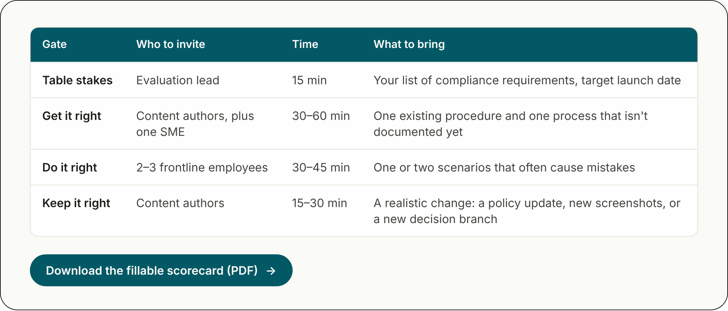
Line up the right people and materials for each session:
- Table stakes: Evaluation lead, 15 minutes. Bring your list of compliance requirements and your target launch date.
- Get it right: Content authors plus one SME, 30–60 minutes. Bring one existing procedure and one process that isn't documented yet.
- Do it right: 2–3 frontline employees, 30–45 minutes. Bring one or two scenarios that often cause mistakes.
- Keep it right: Content authors, 15–30 minutes. Bring a realistic change: a policy update, new screenshots, or a new decision branch.
Total time: about 1.5 to 2.5 hours per platform.
Part 2: Score each platform
Answer each question yes or no for every platform. Every question is written so that yes is a pass. The downloadable PDF scorecard has columns for three platforms, blank rows for your own requirements, and a yes count for each section.
Table stakes
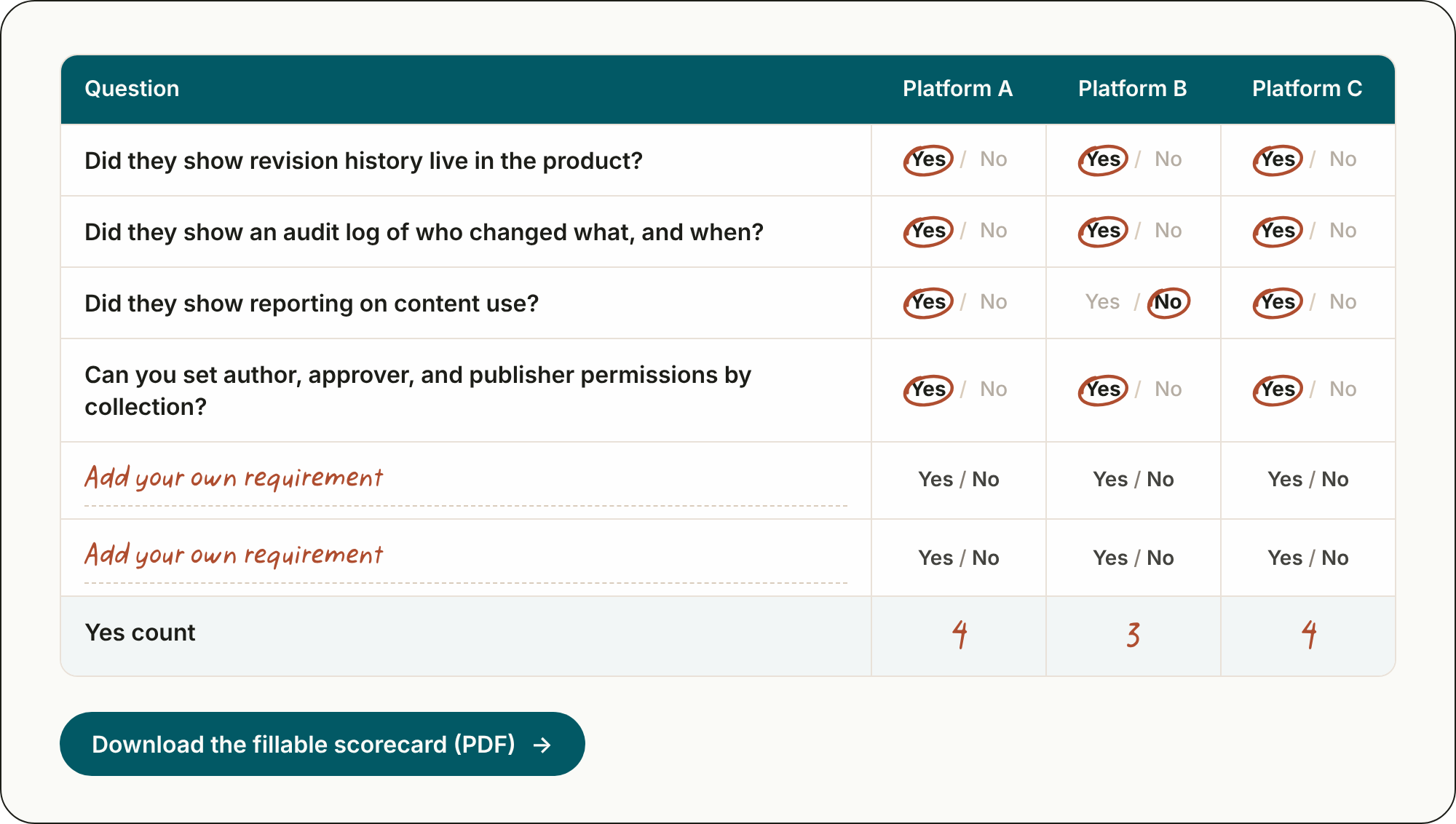
Confirm the basics before you run any gate. Ask:
- Can you see revision history for each procedure?
- Can you see an audit log of changes made?
- Can you see reporting on content use?
- Can you set author, approver, and publisher permissions at different content levels?
Gate 1: Get it right
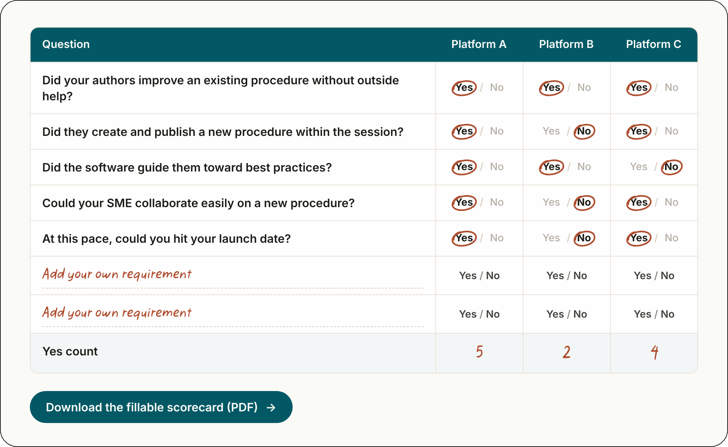
Score whether your team can create content at the pace you need. Ask:
- Did your authors improve an existing procedure without outside help?
- Did they create and publish a new procedure within the session?
- Did the software guide them toward best practices?
- Could your SME collaborate easily on a new procedure?
- At this pace, could you hit your launch date?
Gate 2: Do it right
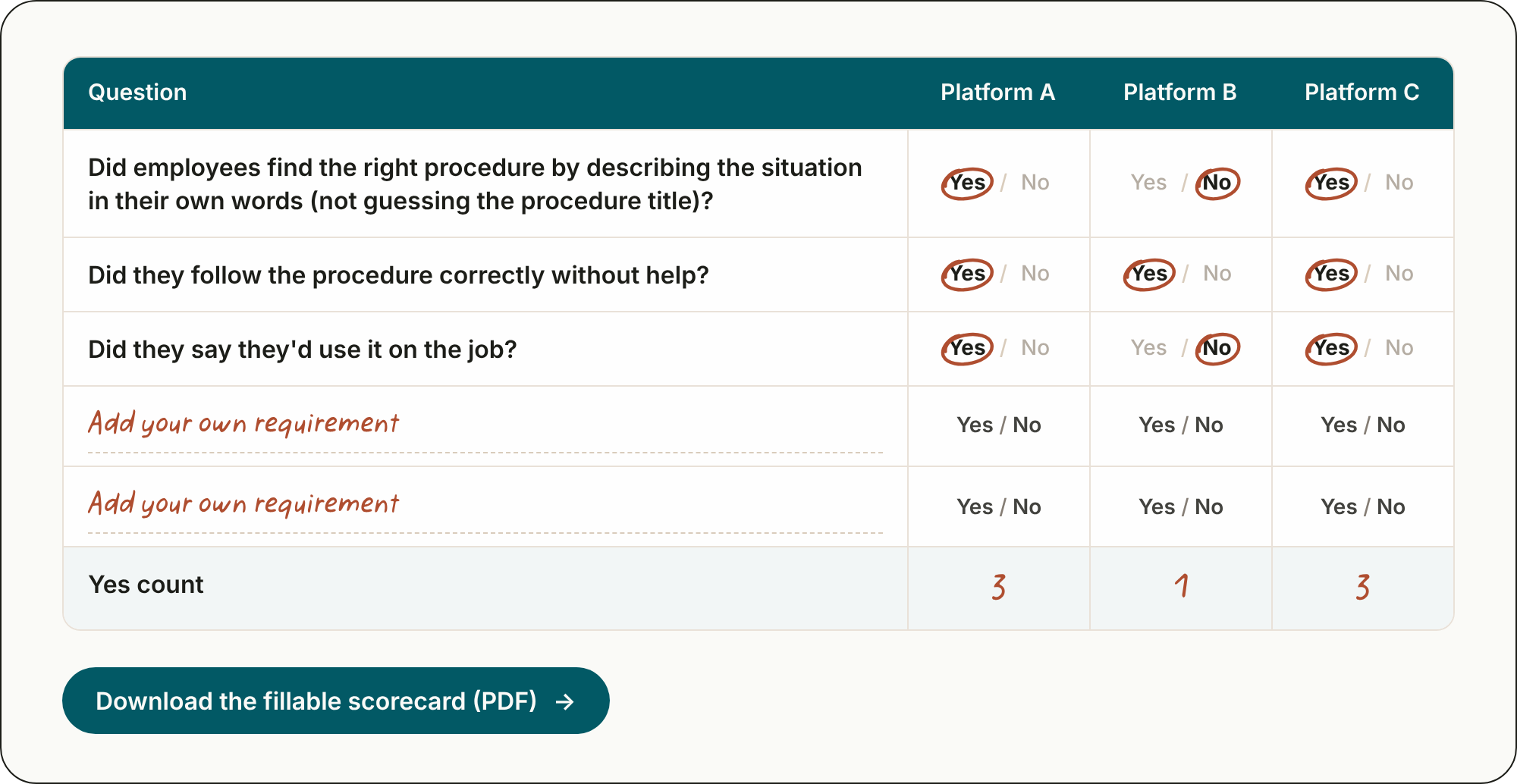
Score whether frontline employees can find the right procedure and follow it. Ask:
- Did employees find the right procedure by describing the situation in their own words (not guessing the procedure title)?
- Did they follow the procedure correctly without help?
- Did they say they'd use it on the job?
Gate 3: Keep it right
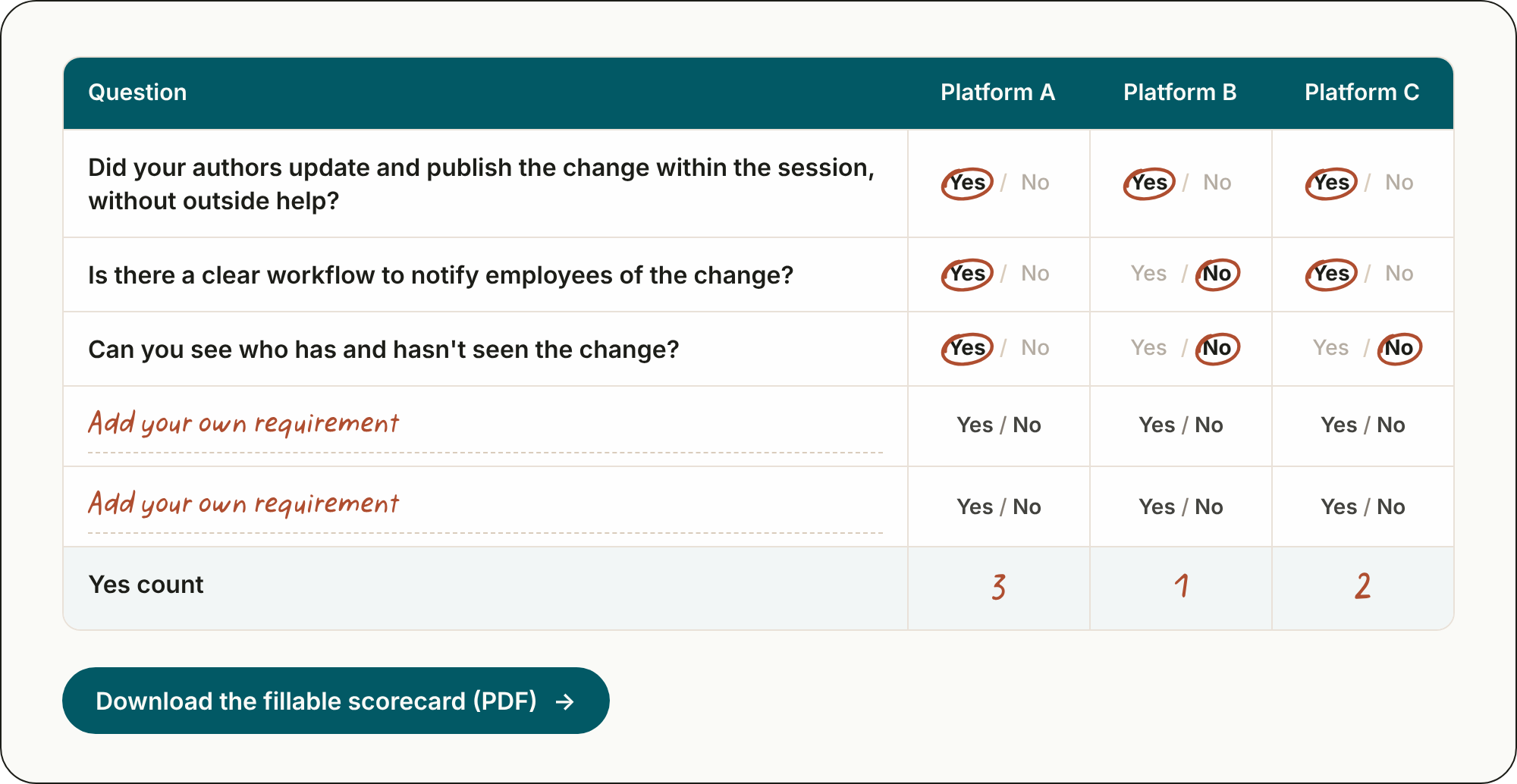
Score whether your team can keep content current and tell employees when it changes. Ask:
- Did your authors update and publish the change within the session, without outside help?
- Is there a clear workflow to notify employees of the change?
- Can you see who has and hasn't seen the change?
How to read your results
- Any "no" in table stakes: Cross the platform off your list.
- Mostly "no" in Gate 1: Stop the evaluation. You won't be able to build content fast enough to launch.
- Mostly "no" in Gate 2 or Gate 3: Look elsewhere. The platform won't change how work gets done, or it won't stay accurate.
- "Yes" across all three gates: You have a finalist your whole team can feel confident about.
These are starting points. Adjust the questions to fit your organization, but keep them the same for every platform.

Running this evaluation with ScreenSteps
If ScreenSteps is on your list, here's how we suggest running each gate.
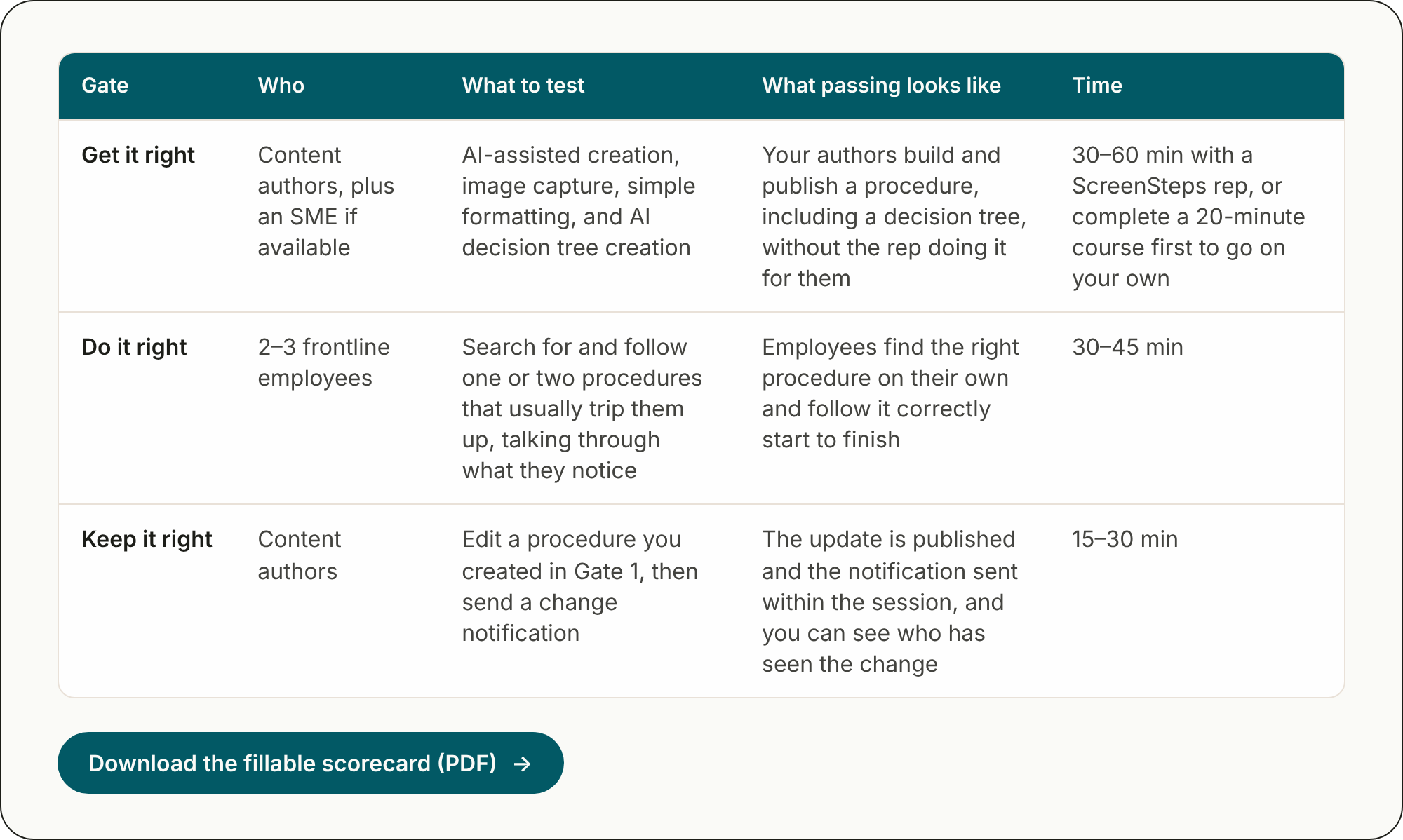
Get it right
- Content authors, plus an SME if available.
- Test AI-assisted creation, image capture, simple formatting, and AI decision tree creation. You pass when your authors build and publish a procedure, including a decision tree, without the rep doing it for them.
- Plan 30–60 minutes with a ScreenSteps rep, or complete a 20-minute course first to go on your own.
Do it right
- 2–3 frontline employees.
- Have them search for and follow one or two procedures that usually trip them up, talking through what they notice. You pass when employees find the right procedure on their own and follow it correctly start to finish.
- Plan 30–45 minutes.
Keep it right
- Content authors.
- Edit a procedure you created in Gate 1, then send a change notification. You pass when the update is published and the notification sent within the session, and you can see who has seen the change.
- Plan 15–30 minutes.
Want help running this evaluation?
Reach out to ScreenSteps and we'll walk through all three gates with you in a working session.