

Starting your standard operating procedures (SOPs) from scratch is a daunting task.
Luckily, you don’t have to start from scratch. If you’re looking to document more of your company’s policies and procedures, you’ve come to the right place.
Working for ScreenSteps — a Knowledge Ops Platform that helps teams create, share, and maintain trusted SOPs — I understand how critical documenting your company procedures is.
So, how do you start documenting your SOPs? Where should you begin?
Here are 12 examples of common SOPs. Use these examples to guide you. They cover a variety of different situations and industries. Then download the free SOP templates here to start documenting your standard operating procedures today.
➡️ JUMP TO SOP EXAMPLES ⬅️
What is a Standard Operating Procedure?
A standard operating procedure (SOP) is a set of documented instructions that guide employees on how to handle different job situations. It is the defined standard for how to perform a task.
The purpose of an SOP is to clarify appropriate approaches to your work and maintain consistency throughout a business.
SOPs can also be referred to as:
- Job aids
- How-tos
- Work instructions
- Procedures
Often, SOPs are step-by-step guides that take an employee through an entire process, like a recipe or a cross-stitching pattern.
But an SOP doesn’t have to be a how-to article. It can also be a decision tree, a checklist, foundational knowledge, and more.
Usable vs Unusable: What Makes a Good SOP?
There are a lot of SOP templates on the internet — and not all of those templates are good. In fact, there are a lot of templates and examples that will lead you in the wrong direction.
Usable SOPs
As a best practice, usable SOPs focus on delivering the information the end user needs as quickly as possible.
The example below showcases the steps for updating account information for a member.
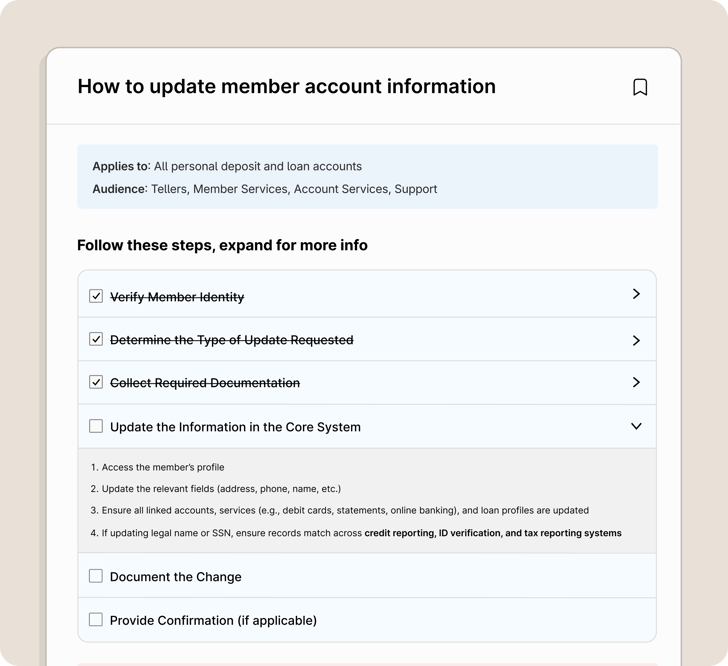
Notice how there’s a spot for background information, but it’s very minimal — just enough to give the reader context so they can know if they’re in the right place.
Unusable SOP example
With an unusable SOP, you often have to scroll through several pages before you even get to the information you need. It includes a lot of information at the top that might be useful for the technical writer and document manager, but it’s not very helpful to the end-user who needs to reference the procedure regularly.
Once you scroll down to page 3, you finally get to a procedure. But it’s either written as a narrative and difficult to follow, or it’s too general and missing important details.
In either case, a first-time reader would need to ask somebody for help because it’s not entirely clear what needs to be done (and how it should be done).
Big takeaway:
Write SOPs with your end user in mind. What will help them perform confidently, consistently, and independently?
3 Main Roles of an SOP
The main purpose of an SOP is to transfer knowledge as fast as possible for a particular task.
What is the most efficient way that you can transfer knowledge? Do you need a Ph.D. to translate this SOP before you can do anything?
A good SOP fulfills these three main roles. For actionable SOPs, you need to:
- Clearly communicate what is being done
- Clearly communicate the main tasks and steps to take
- Simply explain and show how to do those steps and tasks
The goal of an SOP is to help you clearly understand the information presented and enable your employees to take action.
How to Document Usable SOPs in Minutes
Creating usable SOPs doesn’t have to take hours of writing and formatting. The fastest way to document procedures is to capture them while the task is being performed and then convert that capture into a clear, step-by-step guide.
Tools like ScreenSteps with Clarify AI Create make this process much faster. As you complete a task, you can record your screen as you talk through your process. Clarify AI automatically turns that into a structured SOP with steps, instructions, and screenshots.
(See the quick video below for a one-minute example of how to document SOPs with ScreenSteps. For a more in-depth video, check out this full platform overview video.)
How to share and maintain trusted SOPs over time
Writing SOPs is only half the battle. For procedures to actually help your team, employees need to be able to quickly find the right SOP and trust that it’s up to date.
With the ScreenSteps knowledge base, all of your SOPs live in one centralized, searchable location where employees can quickly find the procedure they need and follow it step by step. Instead of digging through folders, PDFs, or outdated documents, your team can access the latest version of every procedure right when they need it.
The ScreenSteps Sidekick browser extension even lets employees access all your SOPs from within any web app or website.
Because SOPs are easy to update and maintain in one place, teams can continuously improve their documentation as processes evolve, ensuring employees always have trusted instructions they can follow with confidence.
5 Types of Standard Operating Procedures (+ Interactive Examples)
There are five main types of SOPs that companies create.
While companies create dozens and even hundreds of different templates for SOPs, all of those SOPs come back to these five standard operating procedures.
Note: The example SOPs shown below were created and shared from the ScreenSteps Knowledge Ops Platform.
While simpler version of these SOP examples can be created in Word, ScreenSteps allows for flexible, interactive elements.
1. Checklist
A checklist is a simple way to communicate your instructions, to ensure every step is accounted for. Checklists fulfill your basic SOP criteria where you need to complete a select set of tasks.
The great thing about a checklist, especially an interactive checklist, is that it can satisfy the needs of both a tenured employee and a new employee.
Tenured employees can quickly scan the checklist to make sure they cover each step, while new employees can expand each item for additional context and information.
Your checklist prompts employees on what to do. It serves as a reminder of what steps to take and in what order to perform those steps.
Below is an example of a checklist article that explains how to update the account information for a credit union member:
Example Checklist SOP
Click into a checklist item to see how it works!
2. Decision Tree
A decision tree is an SOP that guides a user through a set of decisions. It asks a series of questions. Each answer leads to a new question until the task is handled.
Decision trees are especially helpful for complex procedures, such as troubleshooting, that have many possible outcomes.
Example Decision Tree SOP
Click on a decicion branch to see how it works!
3. How-To
A how-to SOP is what people often refer to as work instructions. The how-to article providesclick-by-click instructions on how to complete a task.
This is a workflow that works as if someone were sitting beside the employee, instructing them on what to do for each step.
Example How-To SOP
Notice how this how-to SOP example primarily uses screenshots. It uses minimal words. Instead, it focuses on quickly communicating what needs to be done.
Example How-To SOP
Click on an image to enlarge it!
4. Reference Guide (or Quick Reference Guide)
A quick reference guide (QRG) is often associated with a job aid. This is a document where employees can quickly access simple information, like what hours different offices are open or deadlines to file a claim.
These are often charts or tables that make it easy for someone to skim and gather the information they need.
In this example, a user can quickly scan the columns to understand the different types of checks they can deposit on a mobile device.
Example Quick Reference Guide SOP
5. Foundational Article
A foundational article is an uncommon SOP. A foundational article explains the background context to help people understand your SOPs.
Often, companies will stuff their foundational SOPs into the same articles as how-to guides, checklists, etc. Then their SOPs become crowded and less user-friendly.
That’s why we recommend breaking articles up into smaller articles — including foundational articles — and then linking the articles together.
This foundational knowledge SOP shows the difference between a Roth IRA and a traditional IRA.
Example Foundational Article
7 Examples of SOPs for Businesses
With the five examples above, you have a good baseline for any SOP you create. But to help out a bit more, here are seven more examples. These examples include a few industry and department-specific SOPs.
1. Standard Operating Procedure Example
This SOP example shows your basic workflow article. A workflow article is a decision tree that has interactive technology, such as a knowledge base.
With this example, it starts out as a decision tree. Then the procedure ends as a how-to article with the how-to information.
Example Standard Operating Procedure
Click on a checklist item and decision branch see how it works!
2. HR SOP Example
Your human resource department deals with a lot of SOPs. They are in charge of onboarding new hires. They oversee compliance in your company. And, let's not forget, they are the ones who handle your vacation requests.
Here's an HR SOP example of how you can request time off. This SOP example is a how-to SOP.
Example HR Sop
Click on a checklist item to see how it works!
3. Business (Sales) SOP Example
Your sales team has many procedures they handle as they acquire new customers for your company.
They have procedures for reaching out to prospective customers and procedures to hand off new customers to your teammates handling customer onboarding.
Here are two examples of sales SOP resources. The first example is a checklist for how to qualify a lead.
Example Business SOP
Click on a checklist item to see how it works!
The second example is a quick reference guide. These reference guides are helpful for your sales team to have at their fingertips. Then they can quickly pull up accurate sales information while they are on a call.
This example is for an internet company. This is a simple table to remind the salesperson of the basic contract information, including the cost and length of the contract.
Example Business Quick Reference Guide
4. Credit Union SOP Example
Credit unions typically have more than 500 policies and procedures that their entry-level employees need to know. That's complicated! It helps to have all your SOPs documented and easily accessible.
Here is a standard article SOP that gives a general overview of Roth IRA requirements.
Example Credit Union SOP
Click on a foldable section to see how it works!
Learn how ScreenSteps helps credit unions deliver better member service with more confident employees.
5. Call Center SOP Example
Call center SOPs are typically call flows or call center scripts. There are a variety of different policies and procedures. Each call center is set up differently. You could have one call center to handle all calls or you may have a call center where there are different departments for different services/products.
Call centers get hundreds of calls every day. For each of those calls, you need an intake flow. This is the script a call center agent would use to answer the phone.
Example Contact Center Call Flow
Click on a decision branch see how it works!
Learn how ScreenSteps helps contact centers improve agent performance and reduce agent Time-To-Proficiency.
6. Healthcare scheduling SOP example
People are scheduling and changing doctor's appointments every day. That's why many healthcare services use BPOs to schedule their business.
This example may seem like a repeat of the call center script, but this example has been adjusted for the needs of a healthcare scheduling service. It is also a decision tree SOP.
Example Healthcare Scheduling SOP
Click on a decision branch to see how it works!
A second SOP that comes in handy if you're in healthcare scheduling is a location reference guide. This reference guide allows someone to quickly skim the available staff, hours, services, etc. at different locations.
Example Healthcare Quick Reference Guide
7. Marketing SOP Example
Marketing has a variety of different projects and tasks to handle. From running ad campaigns to using different software, you need a bunch of different SOPs for your marketing team to help them work efficiently.
Here is an example of a basic checklist for publishing a blog post. A person using this checklist would need to understand how to use WordPress.
This checklist is just a prompt so they don't forget a step.
Example Marketing SOP
Create your SOPs with easy-to-follow templates for Google Docs and Microsoft Word
When you create SOPs for your business, it is easier for your employees to work independently and to keep the work consistent across your company.
Ultimately, all SOPs come down to the four different types of SOPs listed above. Hopefully, the additional examples help make drafting your SOPs easier.
Want to make writing SOPs even easier?
Download this free SOP template packet. In the packet, you’ll get five different SOP templates for Google Docs or Microsoft Word. You can reformat the templates for whatever platform you need to use them in.
Or, schedule a ScreenSteps demo to learn how you can capture, share, and maintain trusted SOPs for consistent employee performance.